SO-101 Real-Robot Bring-up and Teleop Recording (Mac / LeRobot 0.6.1)
This procedure drives a WowRobo pre-assembled SO-101 (Leader / Follower) with LeRobot 0.6.1 on a Mac through teleoperation and camera-backed demo recording. Equipment list and work-area contract dimensions are authoritative in hardware.md. Primary references: SO-101, Cameras, Imitation Learning on Real-World Robots.
Measured results reflected here:
- Bring-up on 2026-10-17/18 (connection via UGREEN hub, simultaneous dual-camera streaming, teleop,
lerobot-recordtrials) - Main recording on 2026-10-22 / 23 (table dimensions then in use, camera framing, keyboard controls, motor temperature, clean-set creation). That table is superseded; see Superseded layouts
- Current table setup for bring-up and live eval: 140 × 70 cm layout specification. See Current table layout
- Layout recording on 2026-10-27. Default root is
so101_pick_sponge_layout20261026_20261027.so101_pick_sponge_main_20261020is an archive
Dataset summary: real_dataset_so101_pick_sponge_main_20261023.md. Sim→real unit conversion: sim_to_real_act.md / units.md.
Prerequisites and environment
Use a venv separate from this repository’s .venv for the real robot (avoid interfering with training jobs or sim dependencies).
# Example: create a dedicated venv
python3.12 -m venv "$HOME/work/lerobot-hw/.venv"
source "$HOME/work/lerobot-hw/.venv/bin/activate"
pip install -U pip
pip install 'lerobot[feetech]==0.6.1'
# Add for recording / visualization / training
pip install 'lerobot[dataset,viz]==0.6.1'
# As needed: pip install 'lerobot[hardware,training]==0.6.1'
| Item | Value |
|---|---|
| Python | 3.12 |
| LeRobot | 0.6.1 (pip install 'lerobot[feetech]') |
| Host | Apple Silicon Mac (e.g. MacBook Pro M4) |
| Robot types | --robot.type=so101_follower / --teleop.type=so101_leader |
| Calibration ids | follower / leader (same for every later command) |
Prefer $HOME over ~ in docs (~ right after --dataset.root= is not expanded).
Hardware (as of 2026-10-22)
| Item | Detail |
|---|---|
| Host | MacBook Pro M4. Arms and cameras connected via a USB-C hub |
| Leader | Has a handle. No gripper. Power 5V. Port example /dev/tty.usbmodem5B790143611 |
| Follower | Has a gripper. Power 12V. Port example /dev/tty.usbmodem5B8E1163071 |
| Fixturing | Clamp both arm bases to the table edge with C-clamps |
| Top camera | Logitech C920 on a VIJIM LS08. Current mount: table right edge, 16 cm from the front. See Current table layout |
| Wrist camera | Kit-included USB2.0_CAM1 (Follower gripper side) |
Never swap adapters. Before plugging in, point-check the label voltage against the board side. The board red LED may stay on after unplugging DC (USB power). Drive torque requires the DC adapter. Follower 12V must be ON (LED lit). Measured 2026-10-18: Follower ≈ 12.6 V / Leader ≈ 5.5 V.
Ports can change after unplug/replug. Before work, re-check with ls /dev/tty.usbmodem* and lerobot-find-port.
Camera indices (OpenCV / LeRobot)
| Camera | OpenCV index | Resolution / fps |
|---|---|---|
| wrist (USB2.0_CAM1, follower gripper) | 0 | 640×480 / 30 |
| top (C920) | 1 | 640×480 / 30 |
These indices are the 2026-10-25 cable swap and were still current on 2026-10-26 (same numbers as the 2026-10-18 / 22 sessions).
Indices can also shift after unplug/replug. Confirm with lerobot-find-cameras opencv and outputs/captured_images/opencv_*.png (ffmpeg / avfoundation numbers differ from OpenCV).
Rerun entity names when displaying: observation.top and observation.wrist.
Safety
- At teleop start, the Follower snaps toward the Leader pose. Align both arms before starting.
- Stopping (Ctrl+C) disables torque (
disable_torque_on_disconnect). Gravity drop is possible. Support the Follower by hand before stopping. - In an emergency, unplug the Follower 12V plug first. Keep the power plug within immediate reach.
- Keep the camera stand outside the Follower workspace. The C920 is on the table right edge, 16 cm from the front (2026-10-26). The 2026-10-22 pole (about 23 cm in from the right on a ~134 cm table) is superseded. Contact with a stand has occurred during teleop.
Current table layout (2026-10-26)
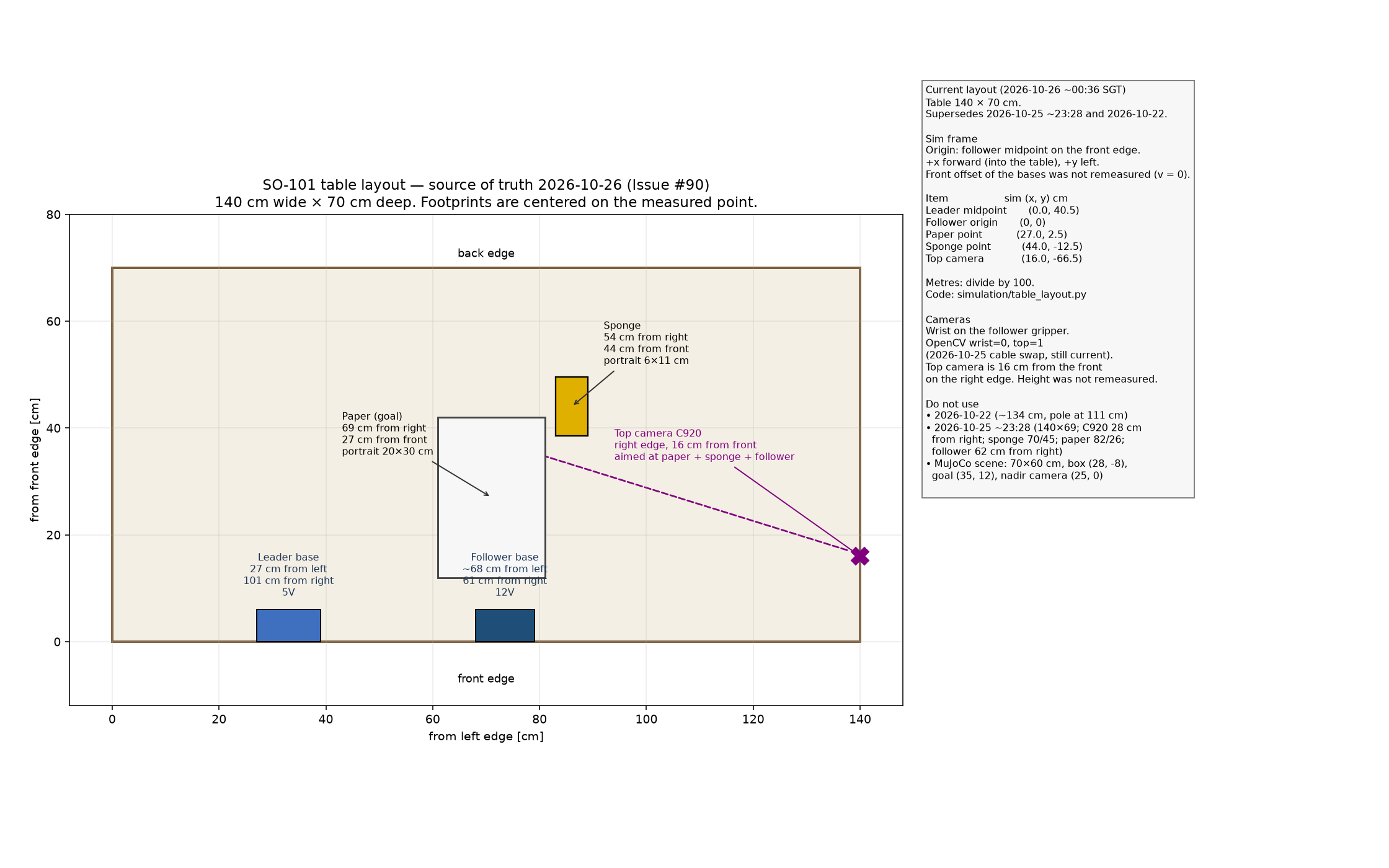
Source of truth for new bring-up, new recording, and real live eval. Measured 2026-10-26 ~00:36 SGT after the top camera was moved so phone filming and the C920 could show the sponge, the paper, and the follower. This supersedes 2026-10-25 ~23:28 and 2026-10-22. Same numbers as hardware.md. Constants: port_pick_align.simulation.table_layout.
Table: 140 cm wide × 70 cm deep. Mark the paper and sponge with tape. Do not move hardware from this section to match an older figure.
| Item | Placement | Notes |
|---|---|---|
| Leader base | 27 cm from left / 101 cm from right | 5V. Opposite sides of the base |
| Follower base | ~68 cm from left / 61 cm from right | 12V. Left distance is approximate |
| Top camera (C920) | Table right edge, 16 cm from front | Aimed so paper, sponge, and follower are in frame |
| Paper (goal) | 69 cm from right, 27 cm from front | Portrait 20 cm wide × 30 cm deep |
| Sponge | 54 cm from right, 44 cm from front | Portrait 6 cm wide × 11 cm deep |
| Wrist camera | Follower gripper | OpenCV 0 |
| Top camera index | OpenCV 1 | 2026-10-25 cable swap, still current |
Top view (front edge at the bottom):
back (70 cm from front)
+------------------------------------------------------------------------------+
|                          sponge 6×11 portrait                                |
|                          54 cm from right, 44 cm from front                  |
|                                                                              |
|  Leader base              paper 20×30 portrait              Follower base    |
|  27 cm from left          69 cm from right                  ~68 cm from left |
|  101 cm from right        27 cm from front                  61 cm from right |
|  5V                                                                  C920    |
|                                                                      right   |
|                                                                      edge,   |
|                                                                      16 cm   |
|                                                                      front   |
+------------------------------------------------------------------------------+
front edge (0)                                                          140 cm
left 0
Sim-frame map
Origin: follower-base midpoint on the front edge. +x is forward (into the table), +y is left. The midpoint is the center of the span implied by ~68 cm from the left and 61 cm from the right (68 cm to 79 cm, midpoint 73.5 cm). Bases were not given a new front offset, so that origin is on the front edge. Paper, sponge, and camera coordinates are the measured points (the note does not say those points are corners).
| Item | Sim (x, y) cm |
Sim (x, y) m |
|---|---|---|
| Leader midpoint | (0, 40.5) | (0, 0.405) |
| Follower origin | (0, 0) | (0, 0) |
| Paper | (27, 2.5) | (0.27, 0.025) |
| Sponge | (44, −12.5) | (0.44, −0.125) |
| Top camera | (16, −66.5) | (0.16, −0.665) |
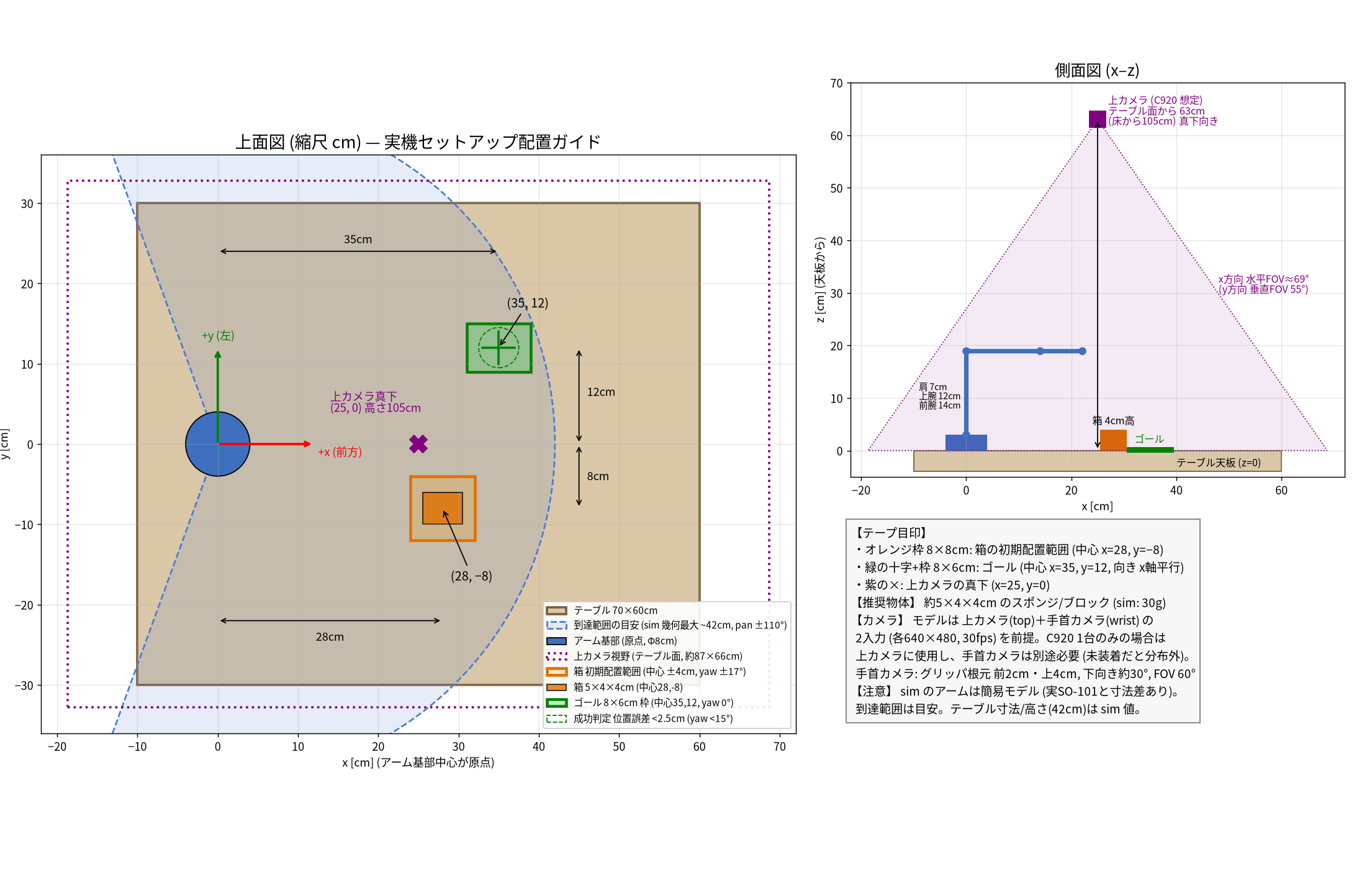
The MuJoCo file so101_tabletop.xml still has the superseded simplified scene (box at (0.28, -0.08) m, goal at (0.35, 0.12) m, nadir camera at (0.25, 0, 1.05) m). Those geoms are not this table. Keep the reachable volume around the follower clear of obstacles and liquids.
Real live-eval checklist
Run this before scripts/run_act_real.sh --live, scripts/run_smolvla_real.sh --live, or lerobot-rollout. Deploy flags stay in real_robot_deploy.md. Scoring, trim, and post-train live evaluation protocol (Japanese): real_eval_protocol.ja.md.
| # | Check |
|---|---|
| 1 | Table is 140 × 70 cm. Ignore 2026-10-22 (~134 cm) and 2026-10-25 ~23:28 (140×69, C920 28 cm from the right) |
| 2 | Leader base 27 cm from left / 101 cm from right (5V). Follower base ~68 cm from left / 61 cm from right (12V) |
| 3 | Paper at 69 cm from right, 27 cm from front (portrait 20×30 cm) |
| 4 | Sponge at 54 cm from right, 44 cm from front (portrait 6×11 cm) |
| 5 | C920 on the right edge, 16 cm from the front, aimed so paper, sponge, and follower are in frame |
| 6 | Wrist camera on the follower gripper. OpenCV wrist = 0, top = 1. Re-check with scripts/preflight_real_so101.sh and lerobot-find-cameras opencv after any unplug |
| 7 | Rerun: observation.top shows paper, sponge, and follower; observation.wrist shows the gripper tip and the sponge on approach |
| 8 | Dry-run first. Support the follower by hand before torque-off. Keep the 12V plug in reach |
Top camera framing
The top view must show all of:
- White paper
- Yellow sponge
- Follower base and gripper work path
The 2026-10-26 mount puts the C920 on the right edge, 16 cm from the front, for that coverage. Before recording or live eval, confirm in Rerun (observation.top / observation.wrist). Do not move the camera back to the 2026-10-22 pole or the 2026-10-25 position (28 cm from the right).
Superseded layouts
Do not set up a new session from these.
2026-10-25 ~23:28
Table 140×69 cm. C920 28 cm from the right. Sponge 70 cm from the right / 45 cm from the front. Paper 82 cm from the right / 26 cm from the front. Follower 62 cm from the right.
2026-10-22 (main teleop recording only)
Distances below are from the left edge. Table width was approximately 134 cm. The sponge had been shifted forward for clearance from the follower base. The clean28 dataset was recorded on this layout; do not rewrite those episodes as the 2026-10-26 table.
| Target | From left edge | From near edge (when applicable) |
|---|---|---|
| Leader arm left edge | 28 cm | — |
| White paper (portrait) | 56 cm | 13 cm |
| Follower arm left edge | 78 cm | — |
| Yellow sponge | 81 cm | 29 cm |
| Top camera pole | 111 cm (23 cm from right edge) | — |
左端 0 cm                                              右端 ~134 cm
+------------------------------------------------------------------+
|                                                                  |
|   Leader          紙(白)         Follower      スポンジ(黄)   C920 |
|   28cm            56cm /13cm前    78cm          81cm /29cm前  111cm|
|     [====]         [紙]            [====]         [スポ]      |pole|
|                                                                  |
|                         (手前縁)                                |
+------------------------------------------------------------------+
Superseded figure (simplified MuJoCo scene, not the 2026-10-22 tape marks): so101_layout_guide_superseded_pre_20261026.png.
USB and port identification
source "$HOME/work/lerobot-hw/.venv/bin/activate"
# Run with USB and power connected to both arms
lerobot-find-port
# When prompted, unplug only the USB of the arm you want to identify, then Enter
# Record the shown port, replug USB. Repeat for the other arm (one at a time)
| Arm | Port (recorded 2026-10-18 / 22) | Power | id |
|---|---|---|---|
| Leader | /dev/tty.usbmodem5B790143611 |
5V | leader |
| Follower | /dev/tty.usbmodem5B8E1163071 |
12V | follower |
On first bring-up, Leader / Follower ports were swapped, so the gripper arm moved as the Leader during teleop. Re-identify ports and redo calibration.
Motor ID check
On WowRobo pre-assembled kits, STS3215 IDs 1–6 and baud rate 1,000,000 are often already set. Scan the port before writing; if correct, skip lerobot-setup-motors.
python -c "from lerobot.motors.feetech import FeetechMotorsBus; print(FeetechMotorsBus.scan_port('$PORT_FOLLOWER'))"
python -c "from lerobot.motors.feetech import FeetechMotorsBus; print(FeetechMotorsBus.scan_port('$PORT_LEADER'))"
- Healthy example:
{1000000: [1, 2, 3, 4, 5, 6]}→ proceed to calibration. - If IDs are missing or only another baud rate is found, check power/wiring, then run
lerobot-setup-motorsper the official docs if needed (SO-101).
Calibration
If the host has no calibration JSON, later connect commands start calibration automatically. Run it explicitly.
lerobot-calibrate \
  --robot.type=so101_follower \
  --robot.port=$PORT_FOLLOWER \
  --robot.id=follower

lerobot-calibrate \
  --teleop.type=so101_leader \
  --teleop.port=$PORT_LEADER \
  --teleop.id=leader
Practical notes:
- Move only the arm whose port is currently being calibrated. Moving the other can cause
same min and maxfailures. - Start pose: each joint near mid-range (roughly an L shape).
- Move every joint except
wrist_rollfully both ways. Avoid wrapping the wrist cable. - Gripper: full open to full close. The Leader trigger travel is inherently short.
- Save locations (default
HF_LEROBOT_HOME=~/.cache/huggingface/lerobot): ~/.cache/huggingface/lerobot/calibration/robots/so_follower/follower.json~/.cache/huggingface/lerobot/calibration/teleoperators/so_leader/leader.json- On re-run, you get a prompt to reuse the existing file or press
cto recalibrate.
Teleoperation
Before starting, match the Leader to the same rest pose as the Follower.
lerobot-teleoperate \
  --robot.type=so101_follower \
  --robot.port=$PORT_FOLLOWER \
  --robot.id=follower \
  --teleop.type=so101_leader \
  --teleop.port=$PORT_LEADER \
  --teleop.id=leader
Optional: --robot.max_relative_target=10 (per-step limit in degrees) or --teleop_time_s=60. Support the Follower by hand before stopping.
Checks: each joint follows in the same direction, gripper opens/closes, no abnormal noise or vibration.
With camera display
lerobot-find-cameras opencv
# Images land in outputs/captured_images/opencv_*.png. Indices can change after unplug/replug
On macOS, camera permission is required the first time (System Settings → Privacy & Security → Camera). iPhone Continuity Camera can steal an index. Disconnect it, and turn Continuity Camera off if needed.
lerobot-teleoperate \
  --robot.type=so101_follower \
  --robot.port=$PORT_FOLLOWER \
  --robot.id=follower \
  --robot.cameras="{ top: {type: opencv, index_or_path: 1, width: 640, height: 480, fps: 30}, wrist: {type: opencv, index_or_path: 0, width: 640, height: 480, fps: 30} }" \
  --teleop.type=so101_leader \
  --teleop.port=$PORT_LEADER \
  --teleop.id=leader \
  --display_data=true
Pre-recording checklist (required)
Run this immediately before every lerobot-record. Ports, camera indices, and the taped layout are defined above. This table is the session gate.
Device presence is scripts/preflight_real_so101.sh. Run it before teleop or record. It is read-only: it does not open the motor bus, move the arm, or write a dataset. Leader port, Follower port, wrist cam, and top cam each print PASS or FAIL, then RESULT PASS or RESULT FAIL. A hard failure exits non-zero. Do not start teleop or lerobot-record after RESULT FAIL.
The preflight checks that the serial nodes exist and that each camera index can be opened. It does not judge framing. Row 6 is still a look at Rerun.
Defaults match scripts/record_real_so101.sh:
| Check | Default |
|---|---|
| Leader port (5V) | /dev/tty.usbmodem5B790143611 |
| Follower port (12V) | /dev/tty.usbmodem5B8E1163071 |
| wrist cam | OpenCV index 0 |
| top cam | OpenCV index 1 |
macOS also creates /dev/cu.usbmodem* for the same adapter. LeRobot commands in this repo use the tty node. Override a moved node with PORT_LEADER, PORT_FOLLOWER, WRIST_INDEX, or TOP_INDEX. The venv is $LEROBOT_HW_ROOT/.venv (LEROBOT_HW is also accepted; default $HOME/work/lerobot-hw), as in scripts/run_act_real.sh.
One OpenCV frame from that venv is the camera check, at the indices lerobot-record uses. Without OpenCV the script lists cameras with system_profiler and ffmpeg avfoundation, and grabs a frame with ffmpeg when it is installed. avfoundation numbers are not OpenCV indices. A listed Continuity Camera, iPhone camera, or iPad camera fails the run: disconnect it and turn Continuity Camera off. The first camera open still needs the macOS Camera permission (System Settings → Privacy & Security → Camera).
PORT_* and *_INDEX apply to the preflight only. scripts/record_real_so101.sh keeps ports and camera indices hardcoded. After a replug, edit that script to the tty node from ls /dev/tty.usbmodem*. The preflight lists other tty.usbmodem* / cu.usbmodem* nodes and does not pick one: auto-selecting a port can swap Leader and Follower.
| # | Check |
|---|---|
| 1 | Table layout follows the current 140 × 70 cm layout. Sponge and paper sit on the taped marks in that section, not legacy tape marks. Keep this dataset separate from the legacy so101_pick_sponge_main_20261020 archive. |
| 2 | Leader power is 5V. Follower power is 12V and the board LED is lit. Adapters stay on the arm they belong to. |
| 3 | Ports were re-read with ls /dev/tty.usbmodem* and scripts/preflight_real_so101.sh (Leader port and Follower port are PASS). Script defaults: Leader /dev/tty.usbmodem5B790143611, Follower /dev/tty.usbmodem5B8E1163071. Edit scripts/record_real_so101.sh when unplug/replug moves them. |
| 4 | OpenCV indices are wrist 0 and top 1. iPhone Continuity Camera is disconnected and off. scripts/preflight_real_so101.sh reports wrist cam and top cam as PASS. Confirm the picture with lerobot-find-cameras opencv. |
| 5 | Leader and Follower start in the same rest pose, so teleop start does not snap the Follower. |
| 6 | A short teleop with the same robot / teleop / camera flags looks right in Rerun (observation.top / observation.wrist). top: paper, sponge, and the Follower base / gripper path are in frame. wrist: gripper tip and sponge are visible on approach. The path clears the stand and clamps. There are no camera warnings. Sponge and paper are on the taped starts for the 2026-10-26 layout. |
| 7 | lerobot-teleoperate is stopped before record. The recording script also pkills it. A leftover teleop process contends for the cameras and the serial ports. |
| 8 | ROOT is a new dataset directory, or an intentional resume of the current layout root (so101_pick_sponge_layout20261026_20261027, or a named batch such as ..._batch2). The script exits when ROOT resolves to so101_pick_sponge_main_20261020. |
| 9 | The root was not created with mkdir before lerobot-record. scripts/record_real_so101.sh sets --resume=true whenever the directory exists, including an empty one. lerobot-record creates the tree on a first recording. A new batch uses a ROOT that does not exist yet. |
| 10 | The shell is an interactive Terminal. Right ends the episode, Left re-records, Esc stops. Start moving as soon as the episode begins. After the place, press Right so the stationary tail stays out of the dataset. |
| 11 | Plan a cool-down about every 10 episodes: power off the Follower and let the motors cool. |
Demo recording rules (finalized 2026-10-22/23)
- 1 episode = 1 pick-and-place. Earlier trials that placed twice in one episode were discarded.
- Start and end in the same rest pose.
- Start moving as soon as the episode begins. A multi-second hold on the opening pose is trimmed later; it is not a reason to drop the episode.
- After placing the sponge on the paper, end the episode early with the Right arrow (the last ~10–17 s of
episode_time_s=25often had a stationary arm). The QC script does not score that tail. Ending with Right is what keeps it out of the dataset. - Move slowly and consistently.
- Rest about every 10 episodes, power off the Follower, and cool the motors. After ~20 continuous episodes, Follower
shoulder_liftlagged commands and mean|action-state|rose to about 10–12° (normally about 1.5°).
Recording script
Use the repository’s scripts/record_real_so101.sh (executable).
# Append N episodes. Auto-resumes if the dataset already exists
scripts/preflight_real_so101.sh
scripts/record_real_so101.sh [N]
scripts/preflight_real_so101.sh must print RESULT PASS before recording.
| Item | Value |
|---|---|
| Default N | 50 |
| Dataset root | $HOME/work/lerobot-hw/datasets/so101_pick_sponge_layout20261026_20261027 |
| repo_id | yohei1126/so101_pick_sponge_layout20261026 |
| Task string | Pick up the yellow sponge and place it on the white paper |
| episode / reset | 25 s / 10 s, fps 30 |
| Logs | $HOME/work/lerobot-hw/outputs/record_main_*.log (cwd is lerobot-hw) |
The default root stores demonstrations collected on the standardized 140 × 70 cm table layout. To prevent accidental mixing with legacy recordings (such as the legacy archive at so101_pick_sponge_main_20261020), scripts/record_real_so101.sh exits if ROOT resolves to that legacy directory. Pass a custom ROOT only when starting a separate new dataset.
The script pkills lerobot-teleoperate before start. Ports and camera indices are hardcoded in the script. Edit them after unplug/replug, or override for your environment.
Do not mkdir the root before the script. Any existing directory, including an empty one, sets --resume=true and appends into that path. lerobot-record creates the tree on a first recording.
Run in an interactive terminal (required)
Keyboard controls:
| Key | Meaning |
|---|---|
| Right | End current episode and go to next |
| Left | Re-record |
| Esc | Stop recording |
Keyboard input does not work under background / non-interactive launch. Run in an interactive macOS Terminal. Terminal may need Accessibility and Input Monitoring permissions.
If you must detach, use a new session (start_new_session / setsid), not nohup. nohup jobs have died after the parent exited.
Audio cues
--play_sounds goes to the macOS default output device. On the working Mac, a Bluetooth Jabra headset was the default. Confirm the output device before recording.
Manual lerobot-record example
Flags equivalent to the script:
source "$HOME/work/lerobot-hw/.venv/bin/activate"
cd "$HOME/work/lerobot-hw"

lerobot-record \
  --robot.type=so101_follower \
  --robot.port=$PORT_FOLLOWER \
  --robot.id=follower \
  --robot.cameras="{ top: {type: opencv, index_or_path: 1, width: 640, height: 480, fps: 30}, wrist: {type: opencv, index_or_path: 0, width: 640, height: 480, fps: 30} }" \
  --teleop.type=so101_leader \
  --teleop.port=$PORT_LEADER \
  --teleop.id=leader \
  --dataset.repo_id=yohei1126/so101_pick_sponge_layout20261026 \
  --dataset.single_task='Pick up the yellow sponge and place it on the white paper' \
  --dataset.num_episodes=10 \
  --dataset.episode_time_s=25 \
  --dataset.reset_time_s=10 \
  --dataset.fps=30 \
  --dataset.no_stamp=true \
  --dataset.push_to_hub=false \
  --dataset.root=$HOME/work/lerobot-hw/datasets/so101_pick_sponge_layout20261026_20261027 \
  --display_data=true \
  --play_sounds=true \
  --resume=true
- Append to an existing root with
--resume=true(the script sets true automatically if the root exists). The root in the example already holds the 10 extracted episodes, so further recording resumes. - In dataset v3.0, videos are concatenated per camera into
videos/observation.images.<cam>/chunk-000/file-000.mp4. - Keep the dataset itself outside git (on the Mac).
Shutdown
- Stop teleop / recording (Ctrl+C or Esc). Support the Follower by hand.
- Unplug the 12V / 5V adapters (DC first, then USB).
- Carry by the base. Do not lift by the cables.
QC a recorded dataset
This section is teleop-recording QC only. Thresholds stay those of scripts/qc_teleop_dataset.py. Post-train real ACT evaluation (open-loop scoring and live rollouts) is covered in the real-eval protocol (Japanese).
scripts/qc_teleop_dataset.py scores one or more local LeRobot v3 roots, episode by episode. It checks that meta/info.json exists before constructing LeRobotDataset, so a missing path is not created. The load uses video_backend="pyav" and download_videos=False, then reads action, observation.state, and episode_index. Videos are not decoded. The pass does not command the arm, and it does not merge, drop, or trim episodes.
Activate the real-robot venv ($HOME/work/lerobot-hw/.venv). HF_HUB_OFFLINE=1 keeps the load on disk.
source "$HOME/work/lerobot-hw/.venv/bin/activate"
HF_HUB_OFFLINE=1 python scripts/qc_teleop_dataset.py \
  --root "$HOME/work/lerobot-hw/datasets/so101_pick_sponge_layout20261026_20261027" \
  --root "$HOME/work/lerobot-hw/datasets/so101_pick_sponge_layout20261026_20261027_batch2"
--repo-id applies to a single --root. The default is repo_id in info.json, otherwise local/<dirname>. --fps overrides the dataset fps. --out is a stem, a .csv/.md path, or a directory. --format is csv, md, or both (default both).
What is measured
Arm joints are every action name that does not contain gripper. When the names are dim* and there are at least two, dim1 is shoulder_lift. Standard deviation is the population value (np.std, ddof=0).
| Quantity | Definition |
|---|---|
| mean motion | Mean absolute frame-to-frame change of action over the arm joints, in degrees per frame |
| head idle | Frame index where the max over arm joints of \|action - action[0]\| first reaches --motion-eps-deg (default 1.0). If the arm never leaves, idle_fr is the episode length T and to_mot is empty. idle_s = idle_fr / fps |
| lag | Mean \|action - state\| per joint, gripper included. lag_sl is always shoulder_lift. max_lag is the joint with the largest mean |
| action std | Per-arm-joint std of action. LOW_MOTION uses the maximum of those values |
Flags
Comparisons below are the ones in the script.
| Flag | Severity | Condition | Before ACT train |
|---|---|---|---|
LOW_MOTION |
high | max arm-joint action std < --low-motion-std-deg (default 5) |
Drop the episode. The whole take is near-static |
HIGH_LAG |
high | max mean \|action-state\| over all joints, gripper included, >= --high-lag-deg (default 6) |
Drop or recheck. On this rig the hot joint is usually shoulder_lift (healthy about 1.5–2°; a long session about 10–12°). The flag is any joint at the threshold |
LONG_HEAD_IDLE |
warn | idle_s > --head-idle-s (default 2). Exactly 2.0 s does not flag |
Light-trim that episode's leading idle using idle_fr / to_mot. The wait alone is not a drop. A fixed cut of 30 frames leaves most of a 3–4 s wait in the take |
Severity is high when LOW_MOTION or HIGH_LAG is present, warn when the only flag is LONG_HEAD_IDLE, and ok otherwise. --strict exits 1 only for high. A warn-only run exits 0. Missing info.json, a load error, or zero episodes exits 1.
The stationary tail is a recording rule: press Right after the place. The script does not score that tail.
Stdout is one row per episode, then episodes / high / warn / ok. Files are qc_teleop_<UTC>.csv and .md under $HOME/work/lerobot-hw/outputs/ when that directory exists, otherwise next to the first --root.
Before ACT train
The script only reports. The train-prep steps are manual:
- Merge the layout batches into one clean root.
- Drop or recheck every
HIGH_LAGepisode. On 2026-10-27 that is set 1 episode 3 (shoulder_liftlag 8.92°). - Light-trim the leading idle. Keep
LONG_HEAD_IDLEepisodes. - Keep this layout separate from
so101_pick_sponge_main_20261020.
The 2026-10-27 layout QC (10 + 10 episodes, 7,369 + 7,373 frames) is on the Mac at $HOME/work/lerobot-hw/outputs/qc_layout20261026_20261027.md.
Next steps
Do not load a sim checkpoint onto the real robot directly. Sim policies use radians for joints; the real Follower uses degrees for body joints and 0–100 for the gripper: the I/O contracts do not match.
- Demo recording → QC (section above,
scripts/qc_teleop_dataset.py) → clean-set creation (real_dataset_so101_pick_sponge_main_20261023.md) - Train ACT on real data:
python -m port_pick_align.training.train_act(training.md). Run on MPS. For sim data usetrain_act --preset sim - Phase 2-2 (sim→real): dry-run with the unit-conversion wrapper → slow live. sim_to_real_act.md
- Real-trained policies (ACT / SmolVLA): no unit conversion. dry-run → live via real_robot_deploy.md (
scripts/run_act_real.sh/scripts/run_smolvla_real.sh). Alternativelylerobot-rollout. First runs: keep--max-relative-target/--max-delta-degsmall, slow, and short
Phase 2-2 quick links (details in sim_to_real_act.md)
# Dry-run (motors not driven); always do this first
python -m port_pick_align.deploy.run_sim_policy_on_real \
  --checkpoint "$HOME/work/lerobot-hw/outputs/sim_act/best_model.pt" \
  --port "$PORT_FOLLOWER" \
  --dry-run \
  --device mps \
  --episode-time-s 20

# Live (keep a hand on the 12V switch. First run: smaller max-delta)
python -m port_pick_align.deploy.run_sim_policy_on_real \
  --checkpoint "$HOME/work/lerobot-hw/outputs/sim_act/best_model.pt" \
  --port "$PORT_FOLLOWER" \
  --device mps \
  --episode-time-s 20 \
  --max-delta-deg 3 \
  --robot-max-relative-target 3
Real-trained policies (recommended: repository runners)
Details, safety settings, and recommended live flags: real_robot_deploy.md.
# ACT (real train_act checkpoint, no unit conversion); default is dry-run
./scripts/run_act_real.sh --device mps --episode-time-s 15
# First live example
./scripts/run_act_real.sh --live --device mps \
  --max-delta-deg 2 --max-delta-gripper 3 --n-action-steps 10 --episode-time-s 15

# SmolVLA fine-tune
./scripts/run_smolvla_real.sh --live --device mps --n-action-steps 25 --episode-time-s 15
Alternative: lerobot-rollout (no unit conversion)
lerobot-rollout \
  --strategy.type=base \
  --policy.path=outputs/train/act_so101_real/checkpoints/last/pretrained_model \
  --robot.type=so101_follower \
  --robot.port=$PORT_FOLLOWER \
  --robot.id=follower \
  --robot.cameras="{ top: {type: opencv, index_or_path: 1, width: 640, height: 480, fps: 30}, wrist: {type: opencv, index_or_path: 0, width: 640, height: 480, fps: 30}}" \
  --robot.max_relative_target=5 \
  --task="Pick up the yellow sponge and place it on the white paper" \
  --duration=30
Troubleshooting
| Symptom | Action |
|---|---|
| Port missing / changes | Confirm data-capable USB-C. Bypass hub and connect direct. ls /dev/tty.usbmodem*. Re-identify after unplug/replug |
Preflight RESULT FAIL |
Read the FAIL line. Fix that port or camera, turn Continuity Camera off, then rerun scripts/preflight_real_so101.sh. Teleop and record wait for RESULT PASS |
| Ports swapped (gripper arm acts as Leader) | Re-run lerobot-find-port one arm at a time; recalibrate |
Permission denied / Resource busy |
Kill the process holding the port with lsof. Stop lerobot-teleoperate before recording |
Missing motor IDs |
Check scan_port, 12V/5V, 3-pin wiring, port swap |
| Teleop runs but Follower does not move | Confirm 12V adapter ON (LED lit) |
| Top camera fails to open / times out | Can happen right after freeing a prior process. Retry often fixes it |
| Keyboard (Right / Left / Esc) ignored | Run in an interactive Terminal. Grant macOS Accessibility / Input Monitoring |
| No audio cues | Check macOS default output device (Bluetooth headset, etc.) |
nohup recording dies |
Detach with a new session (start_new_session / setsid). Interactive Terminal is the main path |
| torchcodec fails on missing FFmpeg dylib | LeRobot falls back to pyav. Long errors are harmless |
AVFFrameReceiver is implemented in both ... |
Harmless. Can appear on successful recordings too |
shoulder_lift tracking lag (mean |action-state| ≈ 10–12°) |
Stop continuous recording; power off Follower and cool. Rest about every 10 epi |
| Camera index shifts / only built-in visible | Turn Continuity Camera off. Confirm with lerobot-find-cameras opencv and saved images |
rerun error with --display_data |
pip install 'lerobot[viz]==0.6.1' |
lerobot-record import error |
pip install 'lerobot[dataset]==0.6.1' |
--dataset.root=~/... fails |
~ is not expanded. Use $HOME or an absolute path |
| Follower hits the camera stand | C920 stays on the right edge, 16 cm from the front. Do not return it to the superseded pole. Mark paper and sponge with tape |
References
- hardware.md: purchased equipment and work-area dimensions
- real_dataset_so101_pick_sponge_main_20261023.md: clean28 dataset summary
- sim_to_real_act.md: Phase 2-2: sim ACT → real Follower (conversion wrapper)
- real_robot_deploy.md: real-trained ACT / SmolVLA dry-run → live
- real_eval_protocol.ja.md: post-train real ACT evaluation protocol (open-loop scoring and live rollout procedures, Japanese). Teleop QC thresholds stay on this page
- units.md: radians / degrees / gripper 0–100
- training.md: ACT training
- LeRobot SO-101
- LeRobot Cameras
- Imitation Learning on Real-World Robots